728x90

- inline-block 요소는 가로 세로 길이를 조정할 수 있다. 그런데, 내가 임의로 조정하지 않는다면 inline 처럼 콘텐츠 크기만큼 줄어든다.
<!DOCTYPE html>
<html lang="en">
<head>
<meta charset="UTF-8">
<meta name="viewport" content="width=device-width, initial-scale=1.0">
<title>Document</title>
<style>
span, p {
background: orange;
border: 1px solid;
margin: 10px;
}
.p2 {
display: inline;
}
</style>
</head>
<body>
<h1>display속성 inline</h1>
<!-- inline 요소에는 span, b, i, a 등이 있음 -->
<span>hello</span>
<p>world</p>
<p class="p2">world</p>
</body>
</html>

- display inline 을 활용하여 p 태그를 inline 으로 바꾸어 주었다.
<!DOCTYPE html>
<html lang="en">
<head>
<meta charset="UTF-8">
<meta name="viewport" content="width=device-width, initial-scale=1.0">
<title>Document</title>
<style>
span {
background: skyblue;
border: 1px solid;
margin: 10px;
width: 300px;
height: 100px;
}
#span2 {
display: inline-block;
}
</style>
</head>
<body>
<h1>display속성 inline-block</h1>
<!-- inline block 요소에는 button, input, select 등이 있다 -->
<div>
<span id="span1">hello</span>
<span id="span2">hello</span>
</div>
</body>
</html>
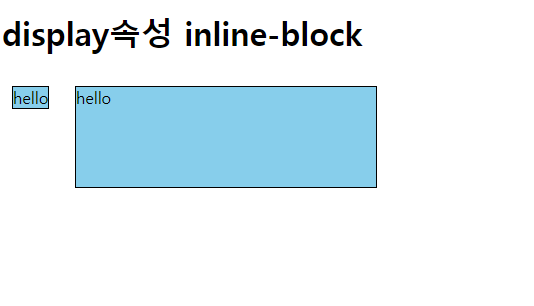
- inline-block 속성 값을 활용하면 width, height 속성 값을 직접 지정해 줄 수 있게 된다.
<!DOCTYPE html>
<html lang="en">
<head>
<meta charset="UTF-8">
<meta name="viewport" content="width=device-width, initial-scale=1.0">
<title>Document</title>
<style>
div {
background-color: royalblue;
width: 100px;
height: 100px;
margin: 10px;
}
#div1 { opacity: 0.4;}
#div2{ opacity: 0.7;}
#div3 { opacity: 1.0;}
</style>
</head>
<body>
<div id="div1"></div>
<div id="div2"></div>
<div id="div3"></div>
</body>
</html>

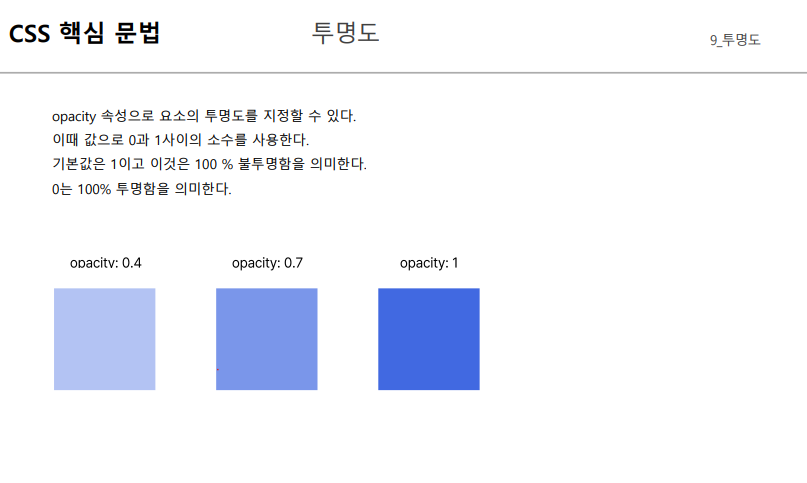
- opacity 0~1 사이에서 1에 가까울 수록 불투명도가 높아지고, 그에따라 진하게 보인다.
- default 값은 1이다.
'[그린컴퓨터] 클라이언트 > CSS' 카테고리의 다른 글
| CSS 핵심 문법 { background, position, flex } (0) | 2023.06.28 |
|---|---|
| CSS 핵심 문법 { font, line, color, text, letter, word } (0) | 2023.06.27 |
| CSS 핵심 문법 { box-sizing, overflow } (0) | 2023.06.27 |
| CSS 핵심 문법 { border 테두리 } (0) | 2023.06.27 |
| CSS 핵심 문법 { CSS 단위, 박스모델, 여백 } (0) | 2023.06.27 |