728x90
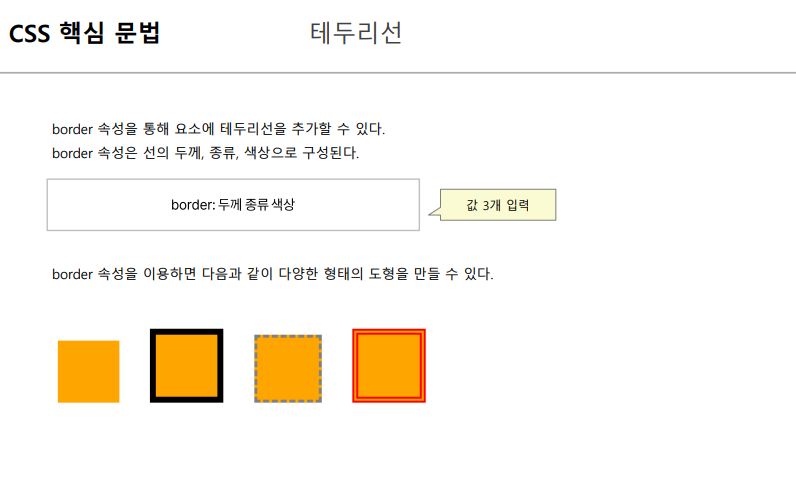
<!DOCTYPE html>
<html lang="en">
<head>
<meta charset="UTF-8">
<meta name="viewport" content="width=device-width, initial-scale=1.0">
<title>Document</title>
<style>
div {
width : 100px;
height : 100px;
margin : 10px;
background-color: orange;
}
.box2 {
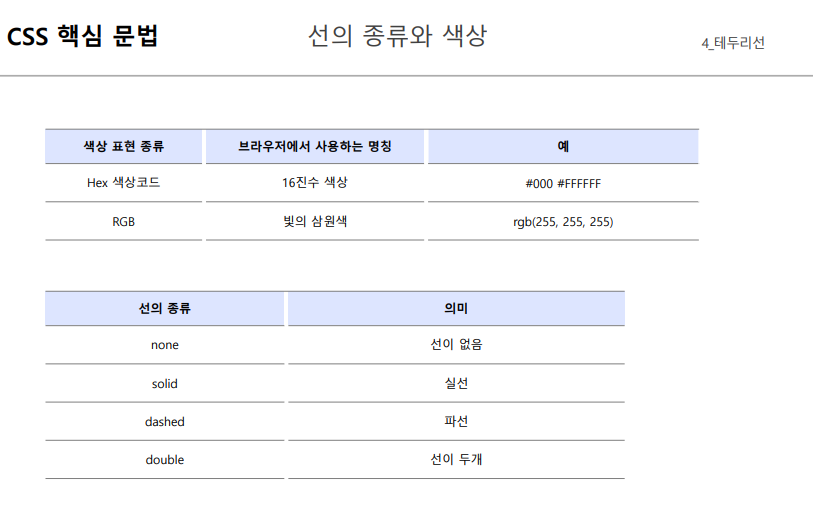
border: 10px solid;
}
.box3 {
border: 5px dashed gray;
}
.box4 {
border: 10px double rgb(255, 0, 0);
}
</style>
</head>
<body>
<div class="box1"></div>
<div class="box2"></div>
<div class="box3"></div>
<div class="box4"></div>
</body>
</html>

- 여기서 유의깊게 보아야 하는 부분이 있다.
border 와 content 영역은 다른 부분임에도 border 종류에 따라서 background color 속성을 똑같이 가져가는 것을 볼 수 있다.
<!DOCTYPE html>
<html lang="en">
<head>
<meta charset="UTF-8">
<meta name="viewport" content="width=device-width, initial-scale=1.0">
<title>Document</title>
<style>
div {
width: 100px;
height: 100px;
margin: 10px;
background-color: orange;
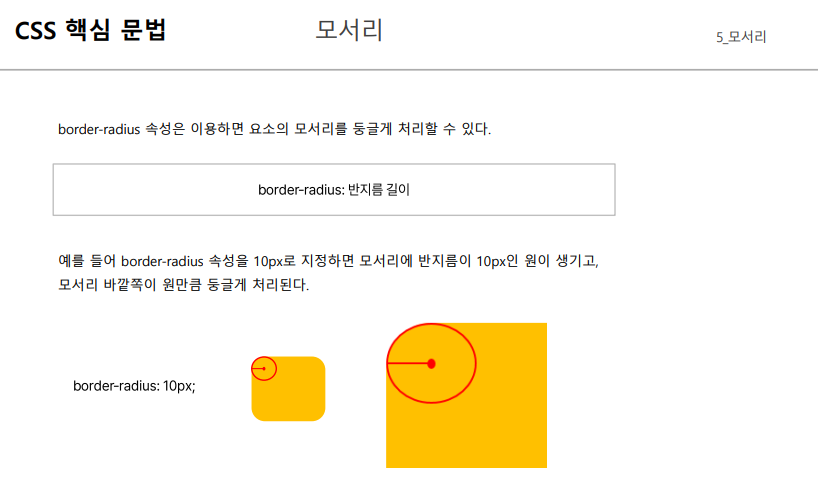
border-radius: 10px;
}
</style>
</head>
<body>
<div></div>
</body>
</html>

- 영역 가운데에 원의 중심점이 생기는 것이 아닌 각 면에 반지름 길이만큼 떨어져서 원이 생기는 것에 유의하자.
'[그린컴퓨터] 클라이언트 > CSS' 카테고리의 다른 글
| CSS 핵심 문법 { display, opacity } (0) | 2023.06.27 |
|---|---|
| CSS 핵심 문법 { box-sizing, overflow } (0) | 2023.06.27 |
| CSS 핵심 문법 { CSS 단위, 박스모델, 여백 } (0) | 2023.06.27 |
| 스타일 상속, 우선순위, 우선순위점수 (0) | 2023.06.27 |
| CSS {기본문법, 주석, 선언방식, 선택자 } (0) | 2023.06.27 |