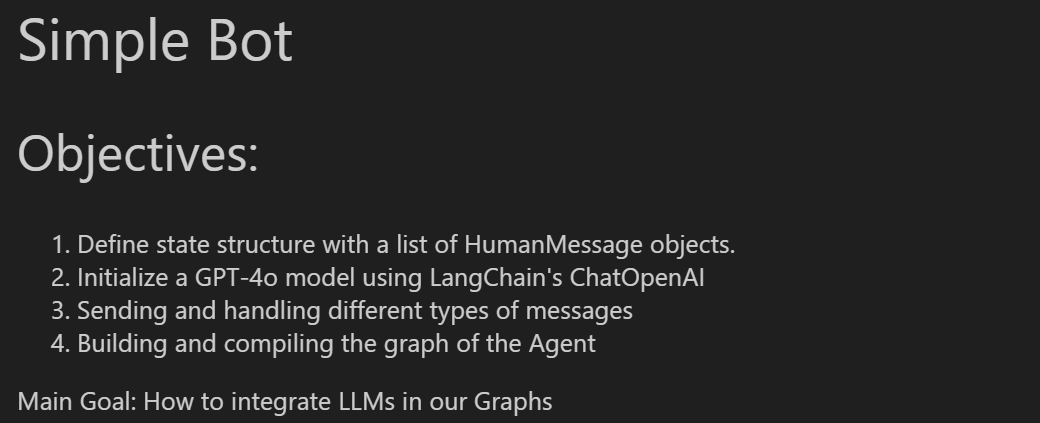
load_dotenv() # API 키 같은 것들 따로 저장해두고 import 해주기

class AgentState(TypedDict):
  messages: List[HumanMessage]

llm = ChatOpenAI(model="gpt-4.1-nano")

def process(state: AgentState) -> AgentState:
  response = llm.invoke(state["messages"])
  print(f"\nAI: {response}")
  return state

graph = StateGraph(AgentState)
graph.add_node("process", process)
graph.add_edge(START, "process")
graph.add_edge("process", END)
agent = graph.compile()

user_input = input("Enter: ")
# agent.invoke({"messages": [HumanMessage(content=user_input)]})
while user_input != "exit":
  agent.invoke({"messages": [HumanMessage(content=user_input)]})
  user_input = input("Enter: ")
위와 같이 구성한 Bot 은 "메모리"가 전혀 없습니다. 지난 대화를 전혀 기억하지 못하고 그 어떠한 메모리도 없는 채팅을 하게 된다는 의미입니다.
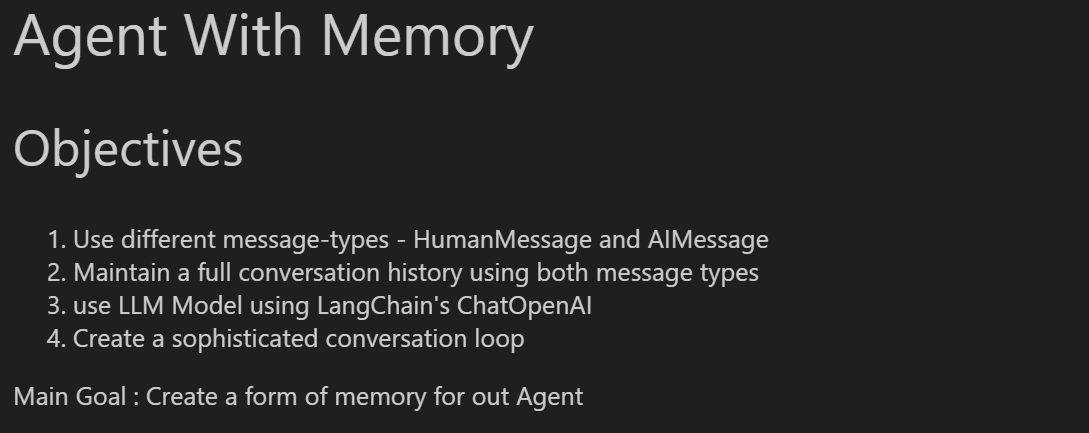
Agent with Memory
from typing import TypedDict, List, Union
from langchain_core.messages import HumanMessage, AIMessage
from langchain_openai import ChatOpenAI
from langgraph.graph import StateGraph, START, END
from dotenv import load_dotenv

load_dotenv()

class AgentState(TypedDict):
  messages: List[Union[HumanMessage, AIMessage]]

llm = ChatOpenAI(model="gpt-4.1-nano")

def process(state: AgentState) -> AgentState:
  """This node will solve the request you input"""
  response = llm.invoke(state["messages"])

  state["messages"].append(AIMessage(content=response.content))
  print(f"\nAI: {response.content}")

  return state

graph = StateGraph(AgentState)
graph.add_node("process", process)
graph.add_edge(START, "process")
graph.add_edge("process", END)
agent = graph.compile()

conversation_history = []

user_input = input("Enter: ")
while user_input != "exit":
  conversation_history.append(HumanMessage(content=user_input))
  result = agent.invoke({"messages": conversation_history})
  print(result["messages"])
  conversation_history = result["messages"] # result messages 로 통으로 교체하는데, 이것은 실행 결과를 보면 바로 이해할 수 있습니다.
  user_input = input("Enter: ")
conversation history 를 직접 관리해주는 것을 볼 수 있다.
대화가 종료되었을 때 해당 대화를 영구 저장시켜놓는 것도 좋은 방법이 될 수 있다.
from typing import TypedDict, List, Union
from langchain_core.messages import HumanMessage, AIMessage
from langchain_openai import ChatOpenAI
from langgraph.graph import StateGraph, START, END
from dotenv import load_dotenv

load_dotenv()

class AgentState(TypedDict):
  messages: List[Union[HumanMessage, AIMessage]]

llm = ChatOpenAI(model="gpt-4.1-nano")

def process(state: AgentState) -> AgentState:
  """This node will solve the request you input"""
  response = llm.invoke(state["messages"])

  state["messages"].append(AIMessage(content=response.content))
  print(f"\nAI: {response.content}")

  return state

graph = StateGraph(AgentState)
graph.add_node("process", process)
graph.add_edge(START, "process")
graph.add_edge("process", END)
agent = graph.compile()

conversation_history = []

user_input = input("Enter: ")
while user_input != "exit":
  conversation_history.append(HumanMessage(content=user_input))
  result = agent.invoke({"messages": conversation_history})
  print(result["messages"])
  conversation_history = result["messages"] # result messages 로 통으로 교체하는데, 이것은 실행 결과를 보면 바로 이해할 수 있습니다.
  user_input = input("Enter: ")

# 모든 대화가 끝났을 때, 대화 내용을 영구 저장 시켜 놓는 것도 좋은 방법입니다.
with open("logging.txt", "w") as file:
  file.write("Your Conversation Log:\n")

  for message in conversation_history:
    if isinstance(message, HumanMessage):
      file.write(f"You: {message.content}\n")
    elif isinstance(message, AIMessage):
      file.write(f"AI: {message.content}\n\n")
  file.write("End of Conversation")

print("Conversation saved to logging.txt")
ReAct Agent (Reasoning and Acting Agent)
class AgentState(TypedDict):
  messages: Annotated[Sequence[BaseMessage], add_messages]

@tool
def add(a: int, b: int):
  """This is an addition function that adds 2 numbers together"""
  return a + b

@tool
def subtract(a: int, b: int):
  """Subtraction function"""
  return a - b

@tool
def multiply(a: int, b: int):
  """Multiplication function"""
  return a * b

tools = [add, subtract, multiply]

model = ChatOpenAI(model="gpt-4.1-nano").bind_tools(tools)

def model_call(state: AgentState) -> AgentState:
  system_prompt = SystemMessage(content="You are my AI assistant, please answer my query to the best of your ability.")
  response = model.invoke([system_prompt] + state["messages"])
  state["messages"] = [response]
  return state

def should_continue(state: AgentState):
  messages = state["messages"]
  last_message = messages[-1]
  if not last_message.tool_calls: # tool call 할 것이 남아있지 않을 때까지 계속 반복 하겠다는 의미입니다.
    return "end"
  else:
      return "continue"

graph = StateGraph(AgentState)
graph.add_node("our_agent", model_call)

tool_node = ToolNode(tools=tools)
graph.add_node("tools", tool_node)

graph.set_entry_point("our_agent")

graph.add_conditional_edges(
  "our_agent",
  should_continue,
  {
    "continue": "tools",
    "end": END,
  }
)

graph.add_edge("tools", "our_agent")

app = graph.compile()

def print_stream(stream):
  for s in stream:
    message = s["messages"][-1]
    if isinstance(message, tuple):
      print(message)
    else:
      message.pretty_print()

inputs = {"messages": [("user", "Add 3 + 4. Add 34 + 148. 150 Minus 24. 12 multiply 10")]}
print_stream(app.stream(inputs, stream_mode="values"))
#
## Task :
Our company is not working efficiently! We spend way too much time drafting documents and this needs to be fixed!
For the company, you need to create ad AI Agentic System that can spped up drafting documents, emails, etc. The AI Agentic System should have Human-AI Collaboration meaning the Human should be able to able to provide continuous feedback and the AI Agent should stop when the Human is happpy with the draft. The system should able to be fast and be able to save the drafts.

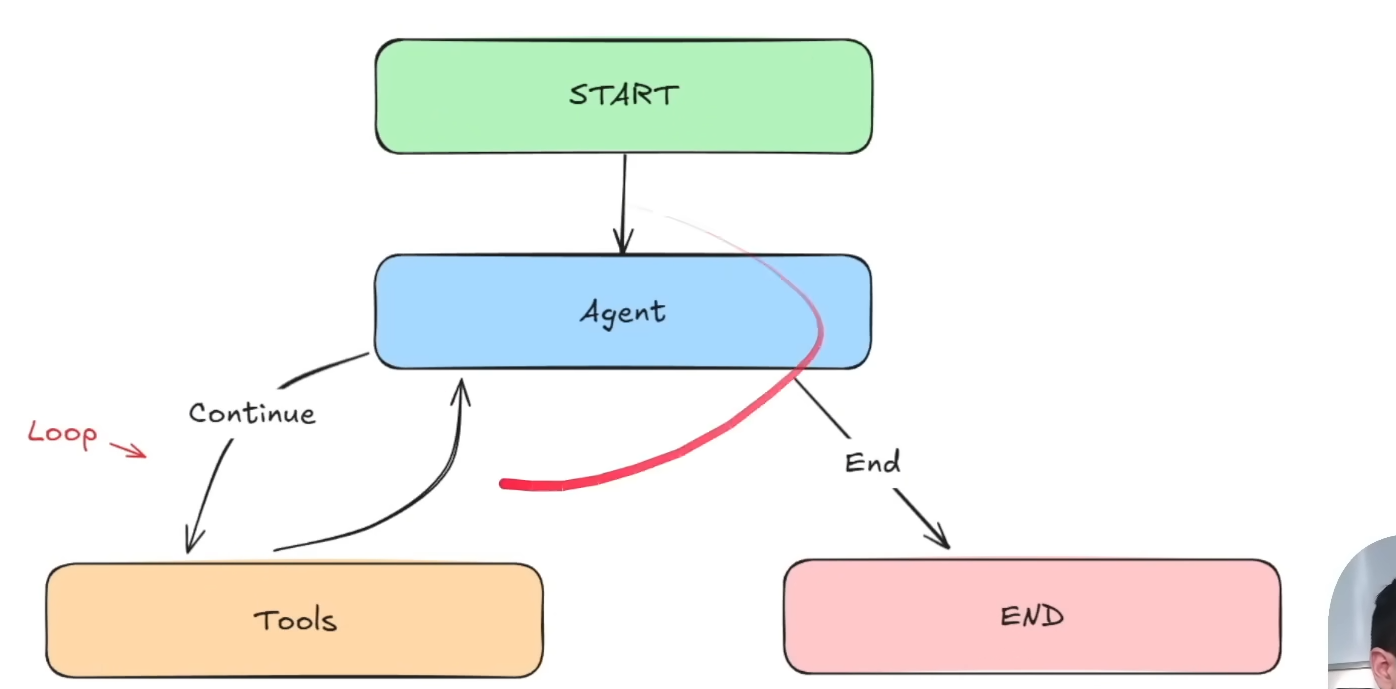
위 그림이 이전 예제인 ReAct 와 다른 점은, 이전에는 tool call 이후 무조건 Agent Node 로 돌아가서 continue 하거나 End 를 했었는데, 이제는 tool 사용 후 독자적으로 end 로 갈 수 있게 변경되었다는 것이다.
from typing import TypedDict, List, Union, Annotated, Sequence
from langchain_core.messages import HumanMessage, AIMessage, ToolMessage, SystemMessage, BaseMessage
from langchain_core.tools import tool
from langchain_openai import ChatOpenAI
from langgraph.graph import StateGraph, START, END
from langgraph.graph.message import add_messages
from langgraph.prebuilt import ToolNode
from dotenv import load_dotenv
load_dotenv()
# This is the global variable to store document content
document_content = ""
class AgentState(TypedDict):
messages: Annotated[Sequence[BaseMessage], add_messages]
@tool
def update(content: str) -> str:
"""Updates the document with the provided content."""
global document_content # 함수 밖에 있는 변수를 사용하겠다고 선언
document_content = content
return f"Document has been updated successfully! The current content is:\n{document_content}"
@tool
def save(filename: str) -> str:
"""Save the current document to a text file and finish the process.
Args:
filename: Name for the text file.
"""
if not filename.endswith('.txt'):
filename = f"{filename}.txt"
try:
with open(filename, 'w') as file:
file.write(document_content)
print(f"\n Document has been saved to: {filename}")
return f"Document has been saved successfuly to '{filename}'."
except Exception as e:
return f"Error saving document: {str(e)}"
tools = [update, save]
model = ChatOpenAI(model="gpt-4.1-nano").bind_tools(tools)
def our_agent(state: AgentState) -> AgentState:
system_prompt = SystemMessage(content=f"""
You are Drafter, a helpful writing assistant. You are going to help the user update and modify documents.
- If the user wants to update or modify content, use the 'update' tool with the complete updated content.
- If the user wants to save and finish, you need to use the 'save' tool.
- Make sure to always show the current document state after modifications.
The current document content is:{document_content}
""")
if not state['messages']:
user_input = "I'm ready to help you update a document. What would you like to create?"
user_message = HumanMessage(content=user_input)
else:
user_input = input("\nWhat would ou like todo with the document? ")
print(f"\n USER: {user_input}")
user_message = HumanMessage(content=user_input)
all_messages = [system_prompt] + list(state["messages"]) + [user_message]
response = model.invoke(all_messages)
print(f"\n AI: {response.content}")
if hasattr(response, "tool_calls") and response.tool_calls:
print(f"USING TOOLS: {[tc['name'] for tc in response.tool_calls]}")
return {"messages": [user_message, response]}
def should_continue(state: AgentState):
messages = state["messages"]
if not messages:
return "continue"
# This looks for the most recent tool message
for message in reversed(messages):
# ... and checks if this is a ToolMessage resulting from save
if (isinstance(message, ToolMessage) and
"saved" in message.content.lower() and
"document" in message.content.lower()):
return "end" # goes to the end edge which leads to the endpoint
return "continue"
def print_messages(messages):
"""Function I made to print the messages in a more readable format"""
if not messages:
return
for message in messages[-3:]:
if isinstance(message, ToolMessage):
print(f"\n TOOL RESULT: {message.content}")
graph = StateGraph(AgentState)
graph.add_node("agent", our_agent)
graph.add_node("tools", ToolNode(tools))
graph.set_entry_point("agent")
graph.add_edge("agent", "tools")
graph.add_conditional_edges(
"tools",
should_continue,
{
"continue": "agent",
"end": END
}
)
app = graph.compile()
def run_document_agent():
print("\n ====== DRAFTER ======")
state = {"messages": []}
for step in app.stream(state, stream_mode="values"):
if "messages" in step:
print_messages(step["messages"])
print("\n ===== DRAFTER FINISHED =====")
if __name__ == "__main__":
run_document_agent()
 ====== DRAFTER ======

 AI: Please provide the content you'd like to update or modify in your document, and I'll assist you with the changes.

 USER: write me an email to tom saying I cannot make it to the meeting

 AI:
USING TOOLS: ['update']

 TOOL RESULT: Document has been updated successfully! The current content is:
Subject: Unable to Attend the Meeting

Hi Tom,

I hope this message finds you well. I wanted to let you know that I won't be able to make it to the meeting scheduled for today.

Apologies for any inconvenience this may cause. Please let me know if there's anything I should be updated on or if I need to reschedule.

Thank you for understanding.

Best regards,

[Your Name]
...

 TOOL RESULT: Document has been saved successfuly to 'Email_to_Tom_Meeting_Change.txt'.

 ===== DRAFTER FINISHED =====
Output is truncated. View as a scrollable element or open in a text editor. Adjust cell output settings...
RAG Agent
# RAG Agent

from dotenv import load_dotenv
import os
from typing import TypedDict, List, Union, Annotated, Sequence
from langgraph.graph import StateGraph, START, END
from langgraph.graph.message import add_messages
from langgraph.prebuilt import ToolNode
from langchain_core.messages import HumanMessage, AIMessage, ToolMessage, SystemMessage, BaseMessage
from langchain_core.tools import tool
from langchain_openai import ChatOpenAI
from langchain_openai import OpenAIEmbeddings
from langchain_community.document_loaders import PyPDFLoader
from langchain_text_splitters import RecursiveCharacterTextSplitter
from langchain_chroma import Chroma


load_dotenv()

llm = ChatOpenAI(
        model="gpt-4.1-nano"
        , temperature = 0 # to minimize hallucination
    )
# Our Embedding Model - has to also be compatible with the LLM
embeddings = OpenAIEmbeddings(
    model="text-embedding-3-small"
)

pdf_path = "Stock_Market_Performance_2024.pdf"

# Safety measure I have put for debugging purposes :)
if not os.path.exists(pdf_path):
    raise FileNotFoundError(f"pdf file not found: {pdf_path}")

pdf_loader = PyPDFLoader(pdf_path)

# Checks if the PDF is there
try:
    pages = pdf_loader.load()
    print(f"PDF has been loaded and has {len(pages)} pages")
except Exception as e:
    print(f"Error loading PDF: {e}")
    raise

# Chunking Process
text_splitter = RecursiveCharacterTextSplitter(
    chunk_size=1000,
    chunk_overlap=200
)

pages_split = text_splitter.split_documents(pages)

persist_directory = r"C:\Users\Metanet\Desktop\Projects\DS-DE-Pilot\890_Result-Projects\990_LangGraph\002_AI_Agents\RAG_Persist"
collection_name = "stock_market"

# If our collection does not exist in the directory, we create using the os command
if not os.path.exists(persist_directory):
    os.makedirs(persist_directory)

try:
    # Here, we actually create the chroma database using our embeddings model
    vectorstore = Chroma.from_documents(
        documents=pages_split,
        embedding=embeddings,
        persist_directory=persist_directory,
        collection_name=collection_name
    )
    print(f"Created ChromaDB vector store!")
except Exception as e:
    print(f"Error setting up ChromaDB: {str(e)}")
    raise

# Now we create our retriever
retriever = vectorstore.as_retriever(
    search_type="similarity",
    search_kwargs={"k": 5} # K is the amout of chunks to return
)
@tool
def retirever_tool(query: str) -> str:
    """
    This tool searches and returns the information from the Stock Market Performance 2024 document.
    """

    docs = retriever.invoke(query)

    if not docs:
        return "I found no relevant information in the Stock Market Performance 2024 document."

    results = []
    for i, doc in enumerate(docs):
        results.append(f"Document {i+1}:\n{doc.page_content}")

    return "\n\n".join(results)

tools = [retirever_tool]

llm = llm.bind_tools(tools)
class AgentState(TypedDict):
  messages: Annotated[Sequence[BaseMessage], add_messages]

def should_continue(state: AgentState):
  """Check if the last message contains tool calls."""
  result = state['messages'][-1]
  return hasattr(result, 'tool_calls') and len(result.tool_calls) > 0

system_prompt = """
You are an intelligent AI assistant who answers questions about Stock Market Performance in 2024 based on the PDF document loaded into your knowledge base.
Use the retriever tool available to answer questions about the stock market performance data. You can make multiple calls if needed.
If you need to look up some information before asking a follow up question, you are allowed to do that!
Please always cite the specific parts of the documents you use in your answers.
"""

tools_dict = {our_tool.name: our_tool for our_tool in tools} # Creating a dictionary of our tools

# LLM Agent
def call_llm(state: AgentState) -> AgentState:
    """Function to call the LLM with the current state."""
    messages = list(state['messages'])
    messages = [SystemMessage(content=system_prompt)] + messages
    message = llm.invoke(messages)
    return {'messages': [message]}

# Retriever Agent
def take_action(state: AgentState) -> AgentState:
    """Execute tool calls from the LLM's response."""

    tool_calls = state['messages'][-1].tool_calls
    results = []
    for t in tool_calls:
        print(f"Calling Tool: {t['name']} with query: {t['args'].get('query', 'No query provided')}")

        if not t['name'] in tools_dict: # Checks if a valid tool is present
            print(f"\nTool: {t['name']} does not exist.")
            result = "Incorrect Tool Name, Please Retry and Select tool from List of Available tools."

        else:
            result = tools_dict[t['name']].invoke(t['args'].get('query', ''))
            print(f"Result length: {len(str(result))}")


        # Appends the Tool Message
        results.append(ToolMessage(tool_call_id=t['id'], name=t['name'], content=str(result)))

    print("Tools Execution Complete. Back to the model!")
    return {'messages': results}
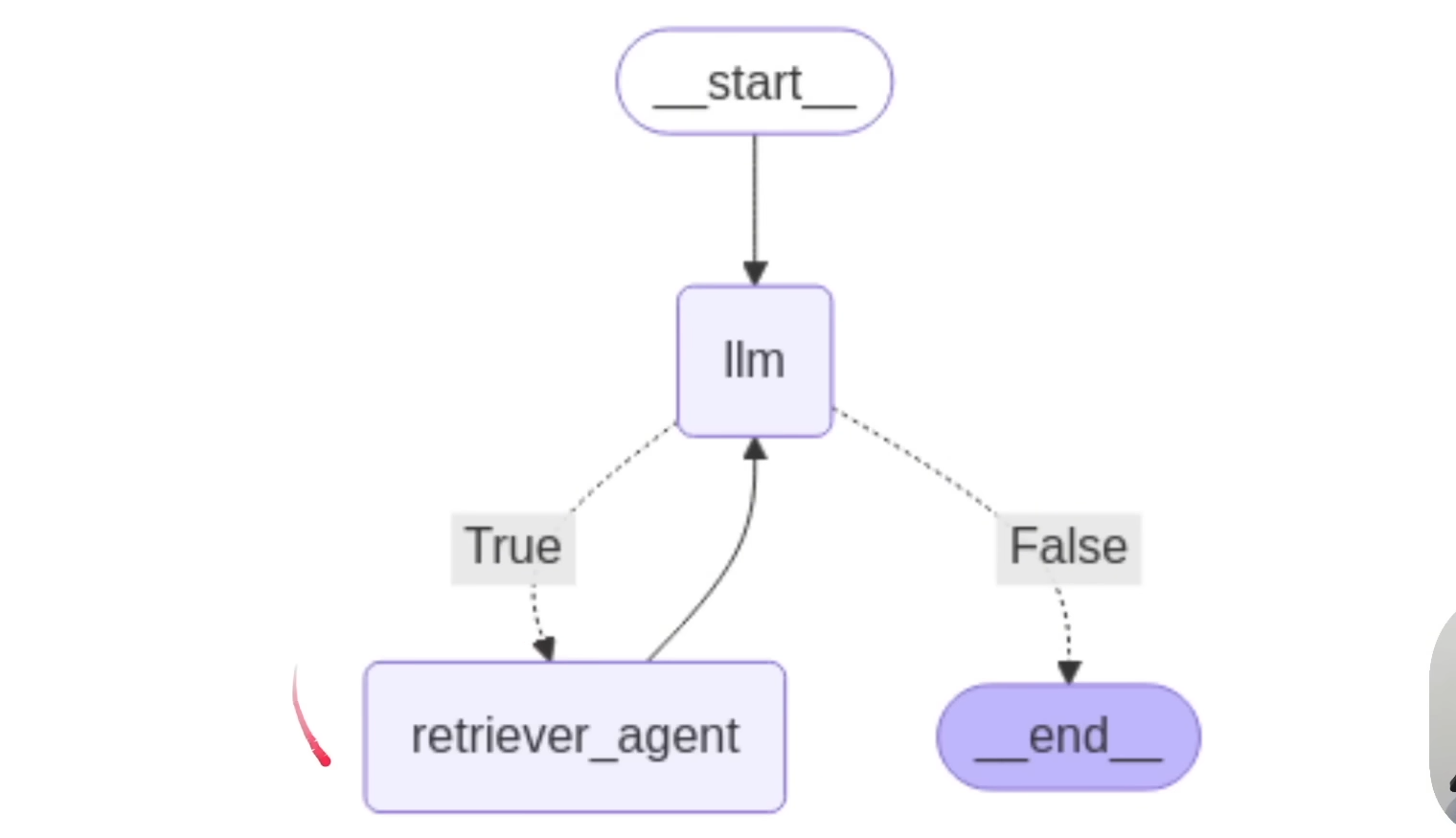
graph = StateGraph(AgentState)
graph.add_node("llm", call_llm)
graph.add_node("retriever_agent", take_action)

graph.add_conditional_edges(
    "llm",
    should_continue,
    {True: "retriever_agent", False: END}
)
graph.add_edge("retriever_agent", "llm")
graph.set_entry_point("llm")

rag_agent = graph.compile()


def running_agent():
    print("\n=== RAG AGENT===")

    while True:
        user_input = input("\nWhat is your question: ")
        if user_input.lower() in ['exit', 'quit']:
            break

        messages = [HumanMessage(content=user_input)] # converts back to a HumanMessage type

        result = rag_agent.invoke({"messages": messages})

        print("\n=== ANSWER ===")
        print(result['messages'][-1].content)


running_agent()
=== RAG AGENT===
Calling Tool: retirever_tool with query: 2024년 시장의 큰 흐름 요약
Result length: 4767
Tools Execution Complete. Back to the model!

=== ANSWER ===
2024년 시장의 큰 흐름을 요약하면, 기술주 중심의 강한 성장세와 함께 온라인 광고 및 소셜 미디어 기업들이 다시 주목받았다는 점입니다. 특히, AI, 클라우드 컴퓨팅, 양자 기술 등 혁신 기술이 시장의 핵심 동력으로 작용했으며, 이들 분야의 기업들이 높은 수익성과 성장 기대를 바탕으로 시장을 주도했습니다.

또한, S&P 500은 약 25%의 상승을 기록하며 2023년에 이어 강한 상승세를 이어갔고, 애플, 구글, 메타와 같은 대형 기술주뿐만 아니라 신생 기술 기업들도 높은 수익률을 기록했습니다. 다만, 이러한 성장과 함께 주가의 평가가 과도하게 높아졌다는 우려도 존재하며, 글로벌 경제의 불확실성, 특히 중국의 경제적 도전이 일부 영향을 미쳤습니다.

Tesla의 경우, 연중 변동성을 겪었지만 최종적으로 약 63%의 상승을 기록하며 강한 회복세를 보였고, 전반적으로 2024년은 기술 혁신과 성장 기대가 시장을 이끈 해였다고 할 수 있습니다.