[그린컴퓨터] 클라이언트/CSS
CSS 핵심 문법 { font, line, color, text, letter, word }
Ben의 프로그램
2023. 6. 27. 13:47
728x90
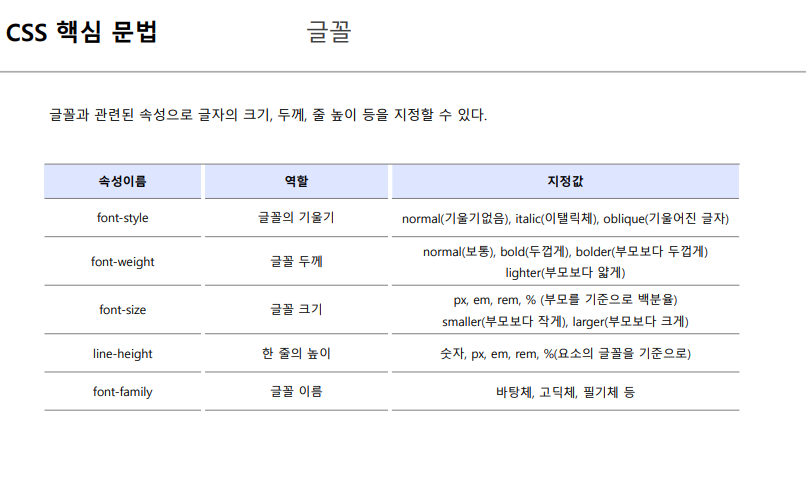
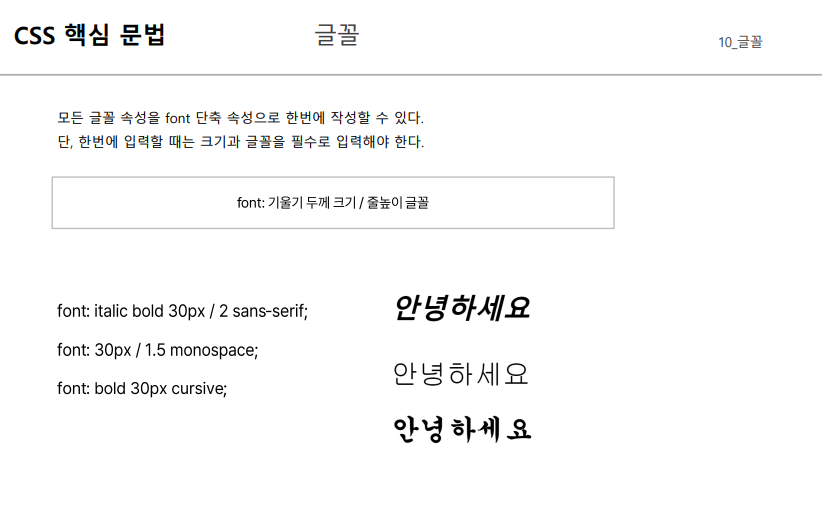
- 줄 높이 2 라는 것은 글자 크기의 2배 만큼을 줄높이로 잡겠다는 것을 의미합니다.
<!DOCTYPE html>
<html lang="en">
<head>
<meta charset="UTF-8">
<meta name="viewport" content="width=device-width, initial-scale=1.0">
<title>Document</title>
<style>
.font1 {
font-weight: bold;
font-size: 20px;
font-style: italic;
}
.font2 {
font: italic bold 30px / 2 sans-serif;
}
.font3 {
font: 30px cursive;
}
.font4 {
text-transform: lowercase;
}
</style>
</head>
<body>
<h1>글자 꾸미기</h1>
<br>
<h2>안녕하세요</h2>
<h2 class="font1">안녕하세요</h2>
<h2 class="font2">안녕하세요</h2>
<h2 class="font3">안녕하세요</h2>
<h2 class="font4">안녕하세요</h2>
</body>
</html>


<!DOCTYPE html>
<html lang="en">
<head>
<meta charset="UTF-8">
<meta name="viewport" content="width=device-width, initial-scale=1.0">
<title>Document</title>
<style>
.font1 {
color: red;
line-height: 3;
letter-spacing: 20px;
/* 자간 20px, 줄간격 3배 */
}
.font2 {
text-decoration: underline;
}
.font3 {
text-indent: 50px;
/* 50px 만큼 들여쓰기 */
}
.font4 {
word-spacing: 50px;
/* 공백문자 너비를 50px 로 늘리기 */
}
</style>
</head>
<body>
<div class="font1">Hello world</div>
<div class="font2">Hello world</div>
<div class="font3">Hello world</div>
<div class="font4">Hello world</div>
</body>
</html>