728x90
연산자, 자료형 간단히 살펴보기
<비교연산자>
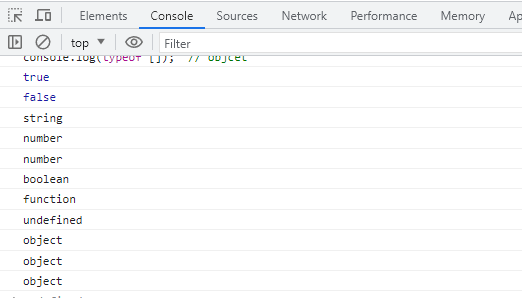
console.log(1 == "1"); // 값만 비교
console.log(1 === "1"); // 값과 자료형까지 비교
<typeof 연산자>console.log(typeof '42'); // String
console.log(typeof 42); // number
console.log(typeof 1.123); // number
console.log(typeof true); // boolean
console.log(typeof function(){}); // function
console.log(typeof undefined); // undefined
console.log(typeof null); // objcet
console.log(typeof {}); // objcet
console.log(typeof []); // objcet
- 첫 번째로 눈여겨 볼 것은 비교연산자들인데, == 와 === 가 수행하는 기능이 다른 것을 알 수 있다.
- 위에서 특이한 것은 Null 값의 자료형인데, Null 값도 object 가 반환되는 것을 확인할 수 있다.

const isShow = true;
if (isShow) {
console.log('Show!');
}
if (isShow) {
console.log('Show!');
} else {
console.log('Hide?')
}
for (let i = 1; i < 11; i++) {
console.log(i);
}

- 제어문인 if 문과 for 반복문은 java 와 큰 차이가 없다는 것을 알 수 있다.

const n = 5;
const m = 3;
for (let i = 0; i < m; i++) {
let result = "";
for (let j = 0; j < n; j++) {
result = result + "*"
}
console.log(result);
}
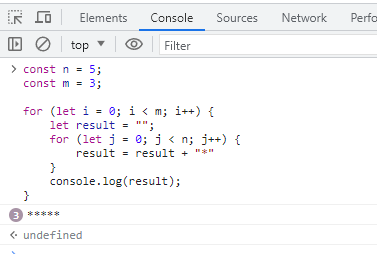
- 3 ***** 라는 결과가 보이는데,
개발자 도구가 중복되는 것은 위와 같이 보여준다는 것을 알아두자.

const arr = [1, 'aa', true, 5, 10];
let result = 0;
for (let i = 0; i < arr.length; i++) {
if (typeof arr[i] == 'number') {
result = result + arr[i];
}
}
console.log(result);

- typeof 가 반환하는 값은 자료형이 아니라 엄밀히 말하면 자료형을 문자형으로 바꾼 값이 반환된다.
그래서 위의 코드에서
typeof arr[i] == Number
로 작성을 하면 프로그램이 정상적으로 실행되지 않는 것을 알 수 있다.
'[그린컴퓨터] 클라이언트 > Javascript' 카테고리의 다른 글
| 동기(Sync)와 비동기(Async) { 일반함수와 콜스택메모리, 비동기함수(setTimeout) 처리과정 } (0) | 2023.06.30 |
|---|---|
| DOM API { DOM API 기본, defer 속성, addEventListener, forEach, textContent } (0) | 2023.06.30 |
| 프로토타입과 상속 { prototype, __proto__ } (0) | 2023.06.30 |
| 일반함수, 익명함수, 화살표함수, this (0) | 2023.06.29 |
| Javascript 개요, 변수&상수, 데이터종류(자료형), JSON&XML 맛보기, 기본&객체자료형 (0) | 2023.06.29 |